

If you want your business to show up when someone searches “near me” in Delhi NCR, then you need to create Google Business Profile the right way.
Today, most customers don’t ask people—they ask Google.
Whether you run a salon, clinic, gym, or digital agency, your business must appear on Google Search and Maps. That’s exactly where Google Business Profile helps you stand out.
In this guide, you’ll learn not just how to create a Google Business Profile but also how to rank higher in Delhi NCR and get real leads.
What is Google Business Profile?


Google Business Profile is a free tool by Google that allows you to list your business online.
When someone searches:
- “Best salon in Delhi”
- “Clinic near me”
- “Digital marketing agency in Noida”
Google shows a list of local businesses with:
- Ratings
- Reviews
- Location
- Contact details
This section is called the Local Pack, and your goal is to rank there.
Why You Should Create Google Business Profile
1. Get Found by Nearby Customers
People in Delhi NCR are constantly searching for services. If your business isn’t listed, you’re losing customers daily.
2. Build Instant Trust
Profiles with reviews, photos, and ratings look more trustworthy than businesses without any online presence.
3. Increase Calls & Walk-ins
Customers can directly:
- Call you
- Visit your location
- Check directions
All from your profile.
Step-by-Step Process to Create Google Business Profile


Creating your profile is simple if you follow the right steps:
Step 1—Go to Google Business Website
Search “Create Google Business Profile” and click on “Manage Now.”
Step 2—Enter Your Business Name
Use your exact brand name. Avoid adding extra keywords here.
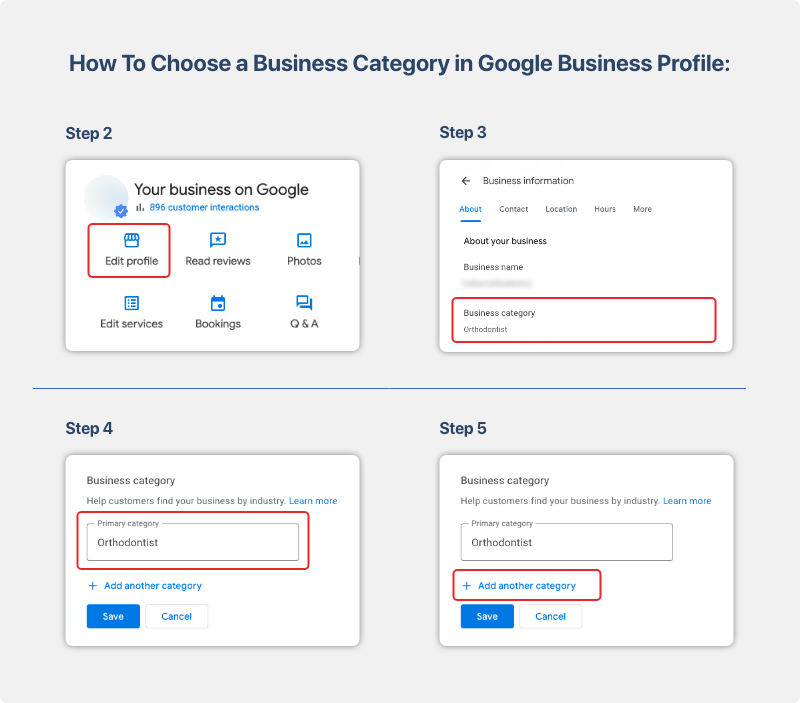
Step 3—Select the Right Category
This is very important. Choose the category that best describes your service.
Step 4—Add Your Location
- Add your shop/office address
- Or select service areas (if you don’t have a physical store)
Step 5—Add Contact Information
Include:
- Phone number
- Website link
Step 6 – Verify Your Business
Verification options include:
- Postcard
- Phone
How to Optimize Google Business Profile for Delhi NCR SEO
Creating is easy—ranking is the real game.
1. Write a Keyword-Rich Description
Use keywords naturally like:
- Create Google Business Profile
- Local SEO Delhi NCR
- GMB expert Delhi
2. Collect Genuine Reviews
Ask happy customers to leave reviews. More reviews = higher ranking.
3. Stay Active with Posts
Post updates like:
- Offers
- Discounts
- Announcements
4. Add Services with Details
Clearly explain what you offer. This helps both Google and customers.
Advanced Local SEO Tips to Rank in Delhi NCR
1. Use Location-Based Keywords
Target searches like:
- “Best service in Delhi NCR”
- “Near me business”
2. List Your Business on Other Platforms
Create listings on:
- Justdial
- Sulekha
- IndiaMART
H3: 3. Keep NAP Consistent
Your name, address, and phone number must be the same everywhere.
4. Answer Customer Questions
Reply to:
- Reviews
- Queries
This improves engagement and ranking.
Common Mistakes You Must Avoid
- Choosing the wrong category
- Using fake reviews
- Not updating business hours
- Ignoring customer feedback
- Uploading low-quality images
Why Choose GMB SEO Wala in Delhi NCR
If you want faster and better results, working with experts can help.
What They Offer
- Complete profile setup
- Keyword optimization
- Review management
- Local ranking strategies
They help businesses rank in:
- Delhi
- Noida
- Gurgaon
- Ghaziabad
How Long Does It Take to Rank?
- Profile setup & verification: 5–15 days
- Initial ranking: 1–2 months
- Top ranking: 3–6 months
Consistency is the key.
FAQs—Create Google Business Profile
Q1: Is Google Business Profile free?
Yes, it is completely free.
Q2: Can I create a profile without a physical shop?
Yes, choose a service-area business.
Q3: How can I rank higher on Google Maps?
Optimize your profile, get reviews, and stay active.
Q4: Can I manage multiple locations?
Yes, Google allows multiple listings.
Q5: Is GMB different from Google Business Profile?
No, it’s the same—just a new name.
Final Words
If you truly want to grow your business in Delhi NCR, the first step is to create Google Business Profile and optimize it properly.
It’s one of the most powerful free tools to
- Get local customers
- Build trust
- Increase sales
Start today, stay consistent, and your business will start appearing where it matters the most—on top of Google.